How to Create Realistic AI Photos With Gemini: Best Prompts, Tips & Tricks for 2026
By
Sahil Unsari
·
11 min read
AI PHOTO LAB • 2026 GUIDE
Create Better AI Photos With Gemini
A practical visual guide to generating, editing and refining
realistic AI images — with prompts you can actually use.
GeminiNano Banana 2AI ProPrompt Lab
CREATE → REFINE → PERFECT
The idea
Stop asking for “a realistic image.”
The better approach is to tell Gemini what the camera sees,
where the light comes from, what the subject is doing,
what should remain unchanged and what the final image is
actually for.
That small change turns image generation from a guessing game
into a repeatable workflow.
01
Generate first.
Then repair the weak parts.
01
GenerateCreate a new scene from a detailed prompt.
02
EditChange one part without rebuilding everything.
03
ReferenceUse images to guide products, people and scenes.
04
RefineFix details until the image is ready to publish.
For eligible Jio users
Google AI Pro without the usual monthly price
Jio currently advertises Google AI Pro free for up to
18 months for eligible users.
FREE
for up to 18 months under the current offer
What the offer includes
Expanded Gemini access
Higher Nano Banana image-generation limits
5 TB storage
Higher access to Flow
Gemini features in selected Google apps
Important:
This should not be advertised as “unlimited image
generation.” Google applies usage limits and these can
change.
Start here
Claiming the Jio offer
If your Jio account is eligible, the basic activation flow is
simple.
1
Open MyJio
Sign in to your Jio account.
2
Find Offer
Look for the Google Gemini banner.
3
Claim
Tap the offer.
4
Use Gmail
Link your Google account.
5
Start
Open Gemini and create.
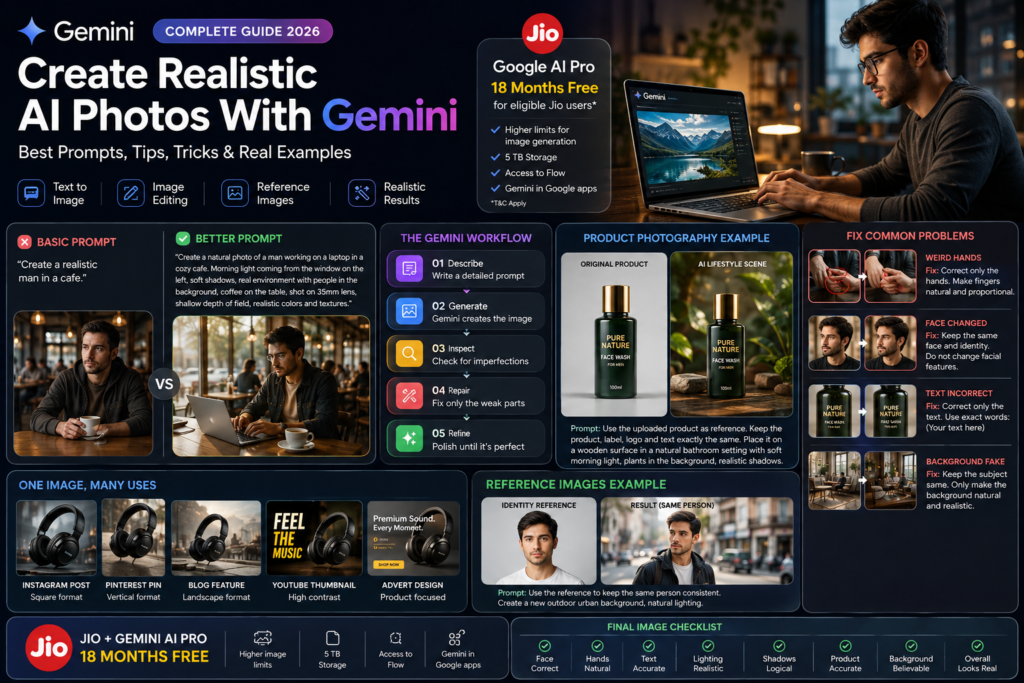
Experiment #01
The 30-second realism test
Start with a deliberately basic prompt. Then improve it.
This makes it easy to understand what actually changes the result.
❌ Basic
Create a realistic person sitting in a cafe.
It tells Gemini the idea, but not enough about the
photograph.
✓ Detailed
Create a natural documentary-style photograph of a young professional
sitting beside a cafe window on a cloudy morning.
Soft diffused daylight enters from the left. Keep the person naturally
posed, with realistic skin texture, normal clothing folds and subtle
environmental imperfections.
35mm photography, eye-level camera, medium shot, shallow but believable
depth of field, natural colors, realistic shadows and reflections.
The image should feel like a real photograph rather than a polished
digital render.
BASIC PROMPT
DETAILED PROMPT
The point isn’t to add dozens of fancy keywords. The point is
to give Gemini enough information to understand the photograph
you have in your head.
Prompt Lab
The prompt formula that actually helps
Use this as a starting framework. You don’t need every line
every time.
Create a [TYPE OF PHOTO] of [SUBJECT].
Environment:
[LOCATION + IMPORTANT BACKGROUND DETAILS]
Action:
[WHAT THE SUBJECT IS DOING]
Lighting:
[LIGHT SOURCE + QUALITY]
Camera:
[ANGLE + LENS LOOK + FRAMING]
Materials/details:
[TEXTURES + IMPORTANT OBJECT DETAILS]
Mood:
[EMOTION / ATMOSPHERE]
Make the scene believable with natural shadows, realistic perspective,
subtle imperfections and physically consistent lighting.
Do not change:
[DETAILS THAT MUST REMAIN UNCHANGED]
Example
One prompt, one complete scene
Copy this
Create a photorealistic editorial portrait of a young professional
standing near a large apartment window.
The person is naturally looking slightly away from the camera.
Soft morning daylight enters from the left and creates gentle shadows
across the room.
Use a natural 50mm portrait-photography look, realistic depth of field,
natural skin texture, realistic hair strands and believable clothing folds.
Keep the apartment slightly imperfect rather than perfectly staged.
Avoid plastic skin, excessive HDR, artificial glow, extreme sharpening
and unrealistic symmetry.
The final result should look like a real photograph captured inside a
real apartment.
What can you create?
One tool. Completely different jobs.
PortraitsProfessional, lifestyle and editorial photos.
ProductsTurn a plain product photo into a lifestyle scene.
TravelCreate realistic destination concepts.
Blog ImagesMake article visuals that explain the topic.
Social MediaBuild visuals for Instagram and Pinterest.
AdvertisingCreate concepts for campaigns and creatives.
For ecommerce sellers
Turn a plain product photo into a lifestyle shot
Upload the actual product photo first. Then make it very clear
that the product itself is not supposed to be redesigned.
Product prompt
Use the uploaded product as the exact product reference.
Keep the product unchanged:
same shape, packaging, logo, label, printed text, proportions and colors.
Place it naturally on a premium wooden table inside a modern home.
Use soft natural window light, realistic contact shadows and believable
reflections.
The environment should support the product without covering it.
Do not redesign, simplify, rewrite or replace any text on the product.
Do not change its proportions.
Commercial product photography with a realistic camera perspective.
Always inspect the final image.
AI can sometimes alter packaging, text, logos or proportions.
For ecommerce, compare the generated result against the
original product before publishing.
Reference workflow
Give Gemini something real to work from
A reference image can be much more useful than trying to describe
every tiny visual detail in text.
Reference 01
Upload the actual product, person, clothing or object
you want the model to understand.
Use this image as the identity/product reference.
Reference 02
If using another image for the environment, explain its
role separately.
Use this second image only as inspiration for the environment and lighting.
Do not copy its subject.
Don’t regenerate everything
The real power is in repairing an image
If 90% of your image looks good, don’t throw it away because
10% is wrong. Tell Gemini to change only the weak part.
Problem
Face changed
Keep everything else unchanged.
Preserve the person’s identity and facial features.
Only correct the face so it matches the uploaded reference.
Problem
Hands look wrong
Correct only the hands.
Make the fingers anatomically natural and proportionate.
Do not change the person’s face, clothing, pose or background.
Problem
Product changed
Restore the product to match the original reference exactly.
Do not change the packaging, label, logo, proportions or colors.
Keep the environment unchanged.
Problem
Background looks fake
Keep the subject exactly the same.
Make only the background more natural and physically believable.
Match its perspective, lighting and depth to the subject.
Problem
Shadows look wrong
Keep the scene unchanged.
Correct only the shadows so they follow the existing light source
and look physically consistent with the objects.
Problem
Text is incorrect
Correct only the visible text.
Use the exact spelling provided below:
[INSERT EXACT TEXT]
Do not change the layout or surrounding objects.
Visual examples
Real photos make the workflow easier to understand
Use reference photos to communicate composition, materials, lighting and product context instead of describing every detail from scratch.
REFERENCE PHOTO
ENVIRONMENT REFERENCE
Consistency trick
Same person. Different locations.
When identity matters, use a suitable reference image and tell
Gemini which characteristics should stay consistent.
A
Reference
Upload the identity reference.
B
Cafe
Change the environment.
C
Office
Keep identity consistent.
D
Travel
Change location again.
E
Campaign
Build a complete set.
Use the uploaded reference as the identity reference.
Keep the person’s recognizable facial features, hairstyle,
overall age appearance and identity consistent.
Create a new scene inside a modern coffee shop.
Change the environment and clothing, but keep the person recognizable
and visually consistent with the reference.
Content creator workflow
One idea → five pieces of content
Content
Instruction
Instagram
Square editorial image with the subject centered
and enough breathing room.
Pinterest
Vertical composition with a clear visual focal point.
Blog
Editorial image that communicates the article topic.
YouTube
Strong focal subject with clean negative space for text.
Advertisement
Product-focused composition with controlled lighting.
Designer trick
Tell Gemini where the text will go
If you’re making a thumbnail, poster or social graphic, don’t
ask Gemini to randomly place the subject.
Create a premium realistic technology photograph.
Place the smartphone on the right side of the composition.
Keep the left side visually clean with a darker, simple background so
a large headline can be added later.
Do not place important objects behind the future text area.
Small details, big difference
10 realism details most people forget
01
Contact shadowsObjects should visually touch the surface.
02
Light directionOne believable source is better than random glow.
03
PerspectiveObjects should share the same camera perspective.
DepthForeground and background should feel connected.
07
ReflectionGlass and metal need believable reflections.
08
Skin textureAvoid the perfectly smooth plastic look.
Which tool?
Gemini or Google Flow?
You want to…
Start with
Why
Create an AI photo
Gemini
Fast image generation and editing.
Edit an uploaded photo
Gemini
Natural-language image editing.
Create product concepts
Gemini
Reference-based workflows.
Create cinematic AI video
Flow
Designed around AI filmmaking workflows.
One thing you should NOT write in your article
❌ “Gemini Pro gives unlimited AI images.”
A safer and more accurate statement is:
Google AI Pro provides expanded access and higher image-generation
limits, but usage limits still apply and can change.
This matters because Google’s own documentation describes
image-generation and other Gemini usage limits.
Before publishing
Your final AI image inspection
Don’t publish immediately after generation. Spend 30 seconds
checking the image.
Completion:
0%
Questions people actually ask
Gemini AI Photo FAQ
Yes. Gemini Apps can generate and edit images using
Google’s Nano Banana image models.
No. Google AI Pro provides expanded access and higher
limits, but usage limits still apply and can change.
Jio currently advertises Google AI Pro free for up to
18 months for eligible users. Eligibility and plan
conditions apply.
Open MyJio, sign in, look for the Google Gemini offer,
tap it and follow the activation process using your
Gmail account.
Nano Banana 2 is Google’s current Gemini image-generation
model for creating and editing images.
Yes. You can upload an image and describe the specific
changes you want.
Nano Banana 2 supports multiple reference images in
supported workflows. Explain what each reference should
control.
Yes. Use the actual product as a reference and clearly
state which product details must remain unchanged.
Gemini’s current image system includes character
consistency features. Reference images and clear
instructions can help maintain identity.
Generic prompts often produce generic results. Add
information about lighting, perspective, materials,
environment and natural imperfections.
Yes. Tell Gemini the intended composition and leave
appropriate negative space when text will be added later.
Yes. Describe the article topic and create an editorial
image that visually communicates the subject.
Check the current Google terms and make sure you have
rights to any reference material, logos, photographs
or other protected content used in your workflow.
Ask for natural skin texture, subtle imperfections,
realistic lighting and normal photographic characteristics
rather than perfectly smooth skin.
There isn’t one universal prompt. The strongest prompts
explain the subject, environment, action, lighting,
camera perspective, composition and important constraints.
Last checked information:
Jio currently advertises a Google AI Pro offer for eligible
users for up to 18 months. Google’s current Gemini documentation
identifies Nano Banana 2 as its image-generation model and
describes image editing, character consistency, reference images,
improved text rendering and other capabilities.
Always verify current eligibility, limits and availability
directly with Jio and Google because promotional offers and
usage limits can change.
The real trick isn’t the prompt.
It’s the workflow.
Generate the first version. Look for one problem. Fix only that
problem. Refine the scene. Then inspect the final image before
publishing.
Once you start working this way, Gemini becomes much more than
a simple AI image generator.
About
Sahil Unsari
Writes about technology, AI, apps and how-to guides at Sahil Unsari.


 BASIC PROMPT
 DETAILED PROMPT


 REFERENCE PHOTO
 ENVIRONMENT REFERENCE