How to Create a FREE eCommerce Website with Blogger and AI
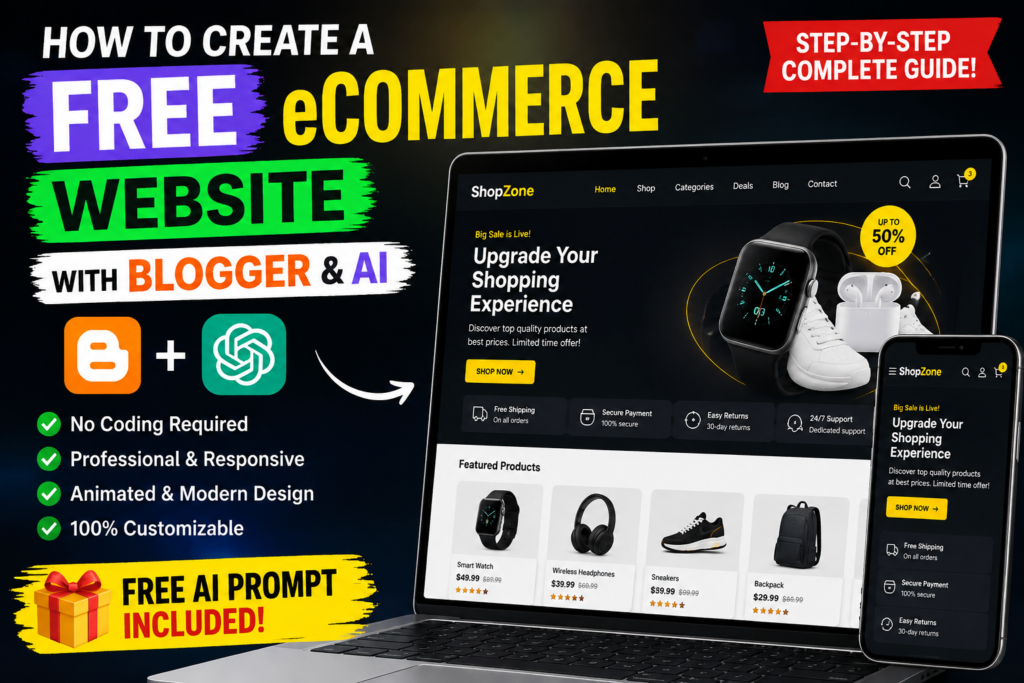
Build a modern, professional and responsive eCommerce-style website using Blogger and AI. In this complete guide, you will learn how to create a custom Blogger theme that looks nothing like a traditional Blogger website.
▶ Watch the Full Tutorial 📋 Get the FREE AI PromptCan You Really Build an eCommerce Website with Blogger?
Yes, Blogger can be customized to create an eCommerce-style website using a properly designed Blogger XML theme together with HTML, CSS and JavaScript.
Blogger is traditionally known as a blogging platform, but a custom-designed theme can completely change the appearance and user experience. Instead of looking like a normal blog, the website can have a modern online-store layout with product cards, categories, promotional banners, search, navigation, cart-style features and responsive design.
The most interesting part is that AI can help you generate, customize and improve the design according to your own store requirements.
🎥 Watch the Complete Video Tutorial
I created a complete YouTube tutorial showing how this concept works and how you can create a professional eCommerce-style Blogger website with the help of AI.
Replace YOUR_YOUTUBE_VIDEO_ID with your actual YouTube video ID.
What You Will Learn in This Guide
AI Theme Creation
Learn how to give AI detailed requirements and generate a custom Blogger theme concept.
eCommerce Design
Create product sections, categories, promotional banners, CTA buttons and store-style layouts.
Responsive Website
Build a layout designed for smartphones, tablets, laptops and desktop screens.
Modern Animations
Add professional transitions, hover effects and scroll animations without making the design distracting.
Performance
Keep the theme lightweight by avoiding unnecessary libraries and heavy scripts.
SEO Foundation
Understand the basic technical SEO elements needed for a search-friendly website.
What Can the Final Website Look Like?
A properly designed Blogger theme can look completely different from a traditional blog. For example, you can create a modern storefront with a professional header, promotional hero section, product categories and product cards.
Premium Products.
Better Shopping.
Discover quality products at amazing prices. Create a better shopping experience for your customers.
SHOP NOW →This is only a visual example. Your actual theme can be customized for your store name, brand colors, products, target audience and preferred design style.
Features You Can Add to Your Blogger eCommerce Website
- Professional eCommerce homepage
- Modern navigation menu
- Sticky header
- Hero promotional banner
- Product categories
- Featured products
- Best-selling products
- Discount and sale sections
- Product cards
- Search interface
- Cart-style front-end experience
- Mobile navigation
- Contact section
- Social media links
- Modern footer
- Hover animations
- Scroll animations
- Responsive design
How AI Can Help You Build the Blogger Theme
The biggest mistake beginners make is asking AI a very simple question such as:
This usually does not give the AI enough information to understand exactly what you want.
Instead, you should provide detailed information about your store, including the store name, website type, products, colors, target audience, design style and required features.
You should also explicitly tell the AI that you need a valid Blogger XML theme rather than ordinary HTML.
Important Blogger Theme Requirements
Blogger themes have specific XML and template requirements. Therefore, a normal HTML website should not simply be renamed as an XML file and expected to work as a Blogger theme.
| Requirement | Why It Matters |
|---|---|
| Valid XML | Invalid XML can prevent the theme from being uploaded or parsed. |
| Blogger Template Tags | Blogger-specific structures are required for dynamic content. |
| Unique IDs | Duplicate IDs can cause template and JavaScript problems. |
| Responsive CSS | Ensures the website works across different screen sizes. |
| Clean JavaScript | Prevents interactive elements from breaking. |
| Optimized Assets | Helps keep the website lightweight and faster. |
Make the Website 100% Responsive
A professional online store should not be designed only for desktop computers. Your visitors may use smartphones, tablets, laptops or large monitors.
- 320px small smartphones
- 375px smartphones
- 414px large smartphones
- 768px tablets
- 1024px tablets and laptops
- 1366px desktop screens
- 1920px large desktop screens
The layout should avoid horizontal scrolling, overlapping elements, unreadable text, distorted images and broken buttons.
Add Professional Animations Without Making the Website Slow
Animations can make an eCommerce website feel more modern, but too many animations can make the website distracting or slow.
- Page-load animation
- Scroll reveal effects
- Product card hover effects
- Image zoom effects
- Button hover transitions
- Mobile menu animation
- Cart interaction animation
- Hero section animation
- Subtle background effects
The goal should be a smooth and premium experience rather than animation everywhere.
How to Optimize the Website for Google Search
Creating a website is only the beginning. If you want organic traffic from Google, your website needs useful content and a solid technical foundation.
- Use a clear and descriptive page title
- Write a useful meta description
- Use one clear primary topic
- Use proper H1, H2 and H3 headings
- Write original and helpful content
- Use descriptive image alt text
- Optimize image sizes
- Keep pages fast and mobile friendly
- Use relevant internal links
- Create useful supporting articles
- Embed relevant YouTube videos
- Monitor search performance in Search Console
How to Turn YouTube Viewers Into Website Visitors
Since this article is connected to a YouTube tutorial, you can create a simple content funnel that gives viewers a reason to visit your website.
Explain the main process in your video and mention that the complete AI prompt is available on your website.
Send viewers to this article for the full prompt, additional instructions, examples and resources.
Give visitors something useful that is easier to access on your website than inside the video description.
Guide visitors to related AI, Blogger, Android and technology tutorials on your website.
Want the complete Blogger AI theme prompt? I have added the full prompt, website example and step-by-step guide on my website.
FREE AI Prompt to Create a Professional Blogger eCommerce Theme
This is the main resource of this article. Copy the complete prompt below, replace the information inside the brackets and give it to ChatGPT.
How to Use the AI Blogger Theme Prompt
Copy the Prompt
Click the button above to copy the complete Blogger eCommerce theme prompt.
Add Your Details
Enter your store name, products, colors, target audience, design style and other requirements.
Generate Your Theme
Give the completed prompt to ChatGPT and ask it to generate the complete Blogger XML theme.
More Blogger and AI Topics You Can Explore
If you want to build search traffic around this topic, you can create additional useful articles targeting closely related questions instead of publishing the same article repeatedly.
- How to Create a Blogger Website with AI
- How to Upload a Custom XML Theme to Blogger
- How to Create a Professional Blogger Theme
- How to Make a Blogger Website Mobile Responsive
- How to Create an Online Store with Blogger
- How to Create an eCommerce Website Without Coding
- How to Use AI to Design a Website
- How to Create a Free Website with AI
- Best AI Tools for Website Design
- How to Customize a Blogger Theme
More Technology Tutorials
If you enjoy AI tools, Android tips, useful websites, software tutorials and technology guides, explore more tutorials on Sahil Unsari.
Frequently Asked Questions
Can I create an eCommerce website with Blogger?
Yes. Blogger can be customized with a suitable XML theme, HTML, CSS and JavaScript to create an eCommerce-style storefront.
Can AI create a Blogger XML theme?
AI can generate Blogger theme code based on detailed requirements. However, generated code should always be reviewed and tested before being used on a live website.
Can I make my Blogger website fully responsive?
Yes. A properly designed custom Blogger theme can be made responsive for smartphones, tablets, laptops and desktop screens.
Can I add animations to a Blogger theme?
Yes. CSS and JavaScript can be used to create professional hover effects, transitions, scroll animations and other visual effects.
Is Blogger free to use?
Blogger provides a free publishing platform and Blogspot address. A custom domain can be added separately if you want a more professional website address.
Will this automatically generate Google traffic?
No. There is no guaranteed method for automatic Google traffic. Search visibility depends on content quality, relevance, competition, technical SEO, website experience and many other factors.
Can I accept real payments through a Blogger website?
A Blogger theme by itself does not automatically provide a complete payment processing system. Real payments and advanced order management may require an external payment provider or eCommerce service.
Can I use this prompt for different types of stores?
Yes. You can use the prompt for fashion, electronics, furniture, beauty, grocery, accessories, digital products and many other types of websites.
🚀 Build Your Own Blogger eCommerce Website with AI
Watch the complete tutorial, copy the free master prompt and start creating your own professional Blogger website.
▶ Watch the Tutorial 📋 Copy the Master PromptSahil Unsari — Technology Made Simple